The report you used to have built,
you now pull yourself from Exact Online
Chat with your Books connects Exact Online to ChatGPT, Claude, Copilot and 10+ other AI assistants you already use, ready within 2 minutes. You ask your question in plain language and the answer comes straight from your own bookkeeping, no reports to run or exports to build. The free plan includes 200 commands per month, roughly 60 questions.
"Which invoices are outstanding?" "Has this invoice already been posted?"
No credit card required. 200 commands per month free (≈ 60 questions)

You work in the AI app you already use
No new app, no separate screen and no chat window on this site. We just make sure your accounting joins in there.
See how to connect: ChatGPT · Claude · Microsoft Copilot · Grok · Perplexity · Vibe (Le Chat) · Gemini
Three kinds of questions
From looking back, to checking, to acting. The middle one carries the most work, and the longest evidence trail.
Asking
What happened?
"Which invoices are more than 60 days overdue, and with whom?"
Where nearly every customer starts.
Checking
Is it right?
"Compare yesterday's entries against our own handbook and flag what deviates."
At one customer, control work has run continuously since April. Since early July it runs as a scheduled daily task across two administrations, with around forty logged rounds.
Doing
Carry it out
"Post this purchase invoice, with the receipt attached."
Available from Pro, and off by default. You switch it on per administration and every action lands in your write log. Deleting is off by default, even when writing is on.
Set up once
Connect Exact Online to your AI assistant. Then ask questions in your own chat.
Connect Exact Online
Log in with your Exact Online account via the official secure connection (OAuth). No credit card needed.
Pick your AI assistant
Add the connection in ChatGPT, Claude or Copilot. See the setup guide
Ask your first question
For example: which invoices are outstanding? You get an immediate answer from your own administration.
After you click, you log in with your Exact Online account and ask your first question within 2 minutes.
From question to action
Your AI assistant works with your Exact Online data through our connection.

You ask
Ask a question or give an instruction in ChatGPT, Claude or Copilot.
We connect
The connection retrieves Exact Online data or writes back after your approval.
The AI helps
Get a sourced answer, a check, a report or a posted entry.
What can you do with it?
Choose one action or combine them. This is not a fixed sequence.

Ask what you want to know
No running reports, no creating exports. Just ask your question.
These are examples. Want to try this yourself, without an account? Open the demo.
"Which invoices are still outstanding?"
You have 3 outstanding invoices:
- • Client Inc — €2.450 (15 days overdue)
- • ABC Ltd — €890 (due tomorrow)
- • Demo Co — €1.200 (7 days left)
"What was last month's revenue?"
December 2025 revenue was €47.250
12% more than November (€42,150)
"Do the account numbers on these purchase invoices differ from the supplier records?"
On 2 of the 14 invoices it differs:
- • Supplier A — different account number than on record
- • Supplier B — bank code does not match that bank
I have not changed anything. Shall I check the remaining outstanding items too?
"Post this purchase invoice, with the receipt attached."
This administration is set to read-only, so I won't post anything. On Pro you switch writing on per administration in your dashboard, and then I can post it. Shall I check in the meantime whether this invoice has been posted before?
See it in action
Real results from the demo environment. This is what you get when you ask a question about your accounting.
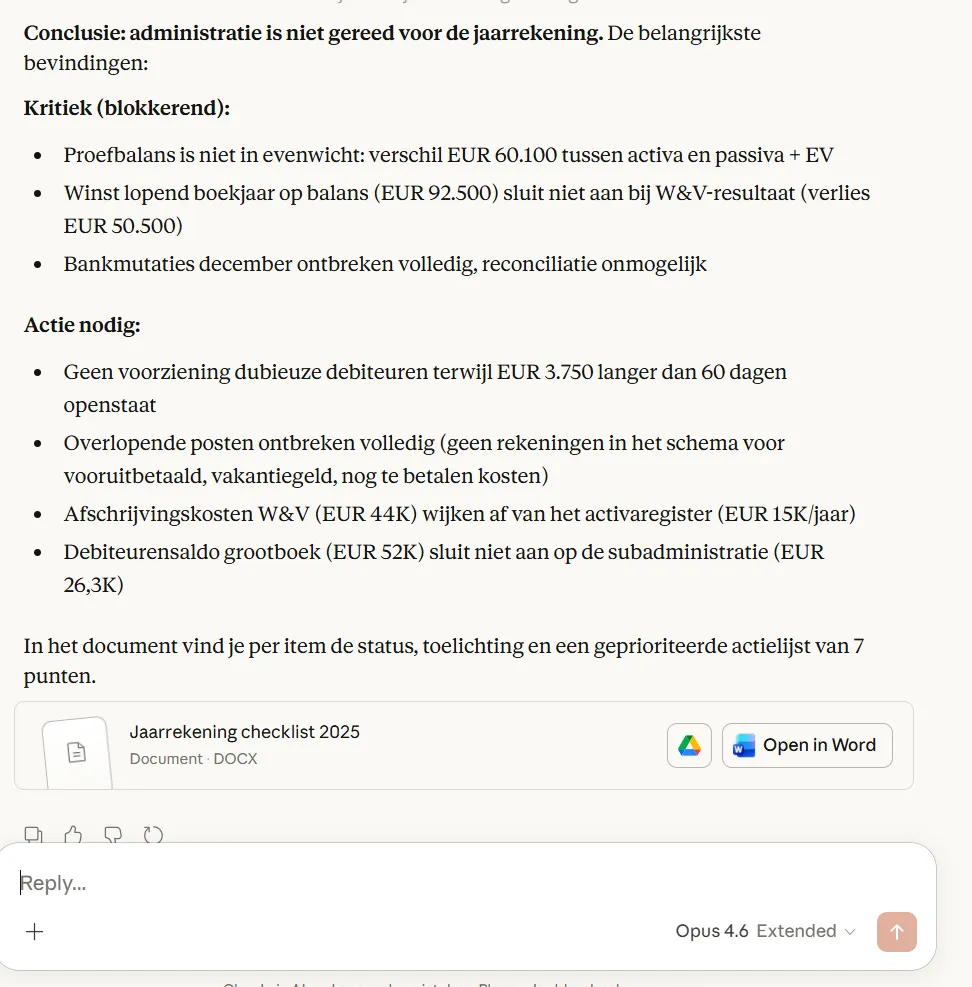
Annual accounts analysis
AI assesses whether your administration is ready for annual accounts
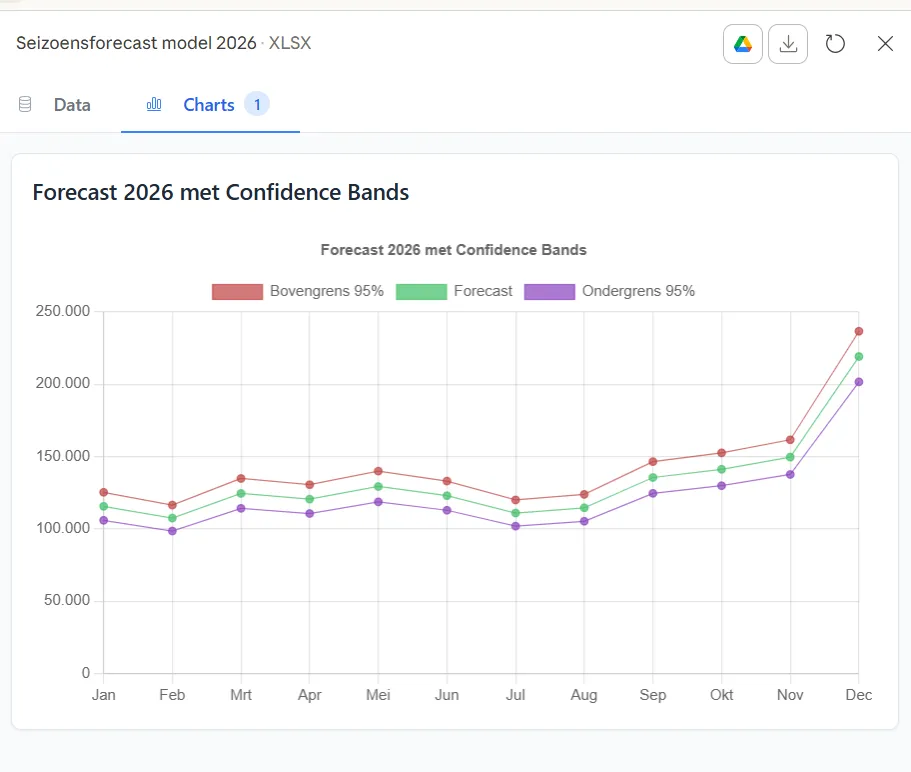
Revenue forecast
Seasonal forecast with confidence intervals
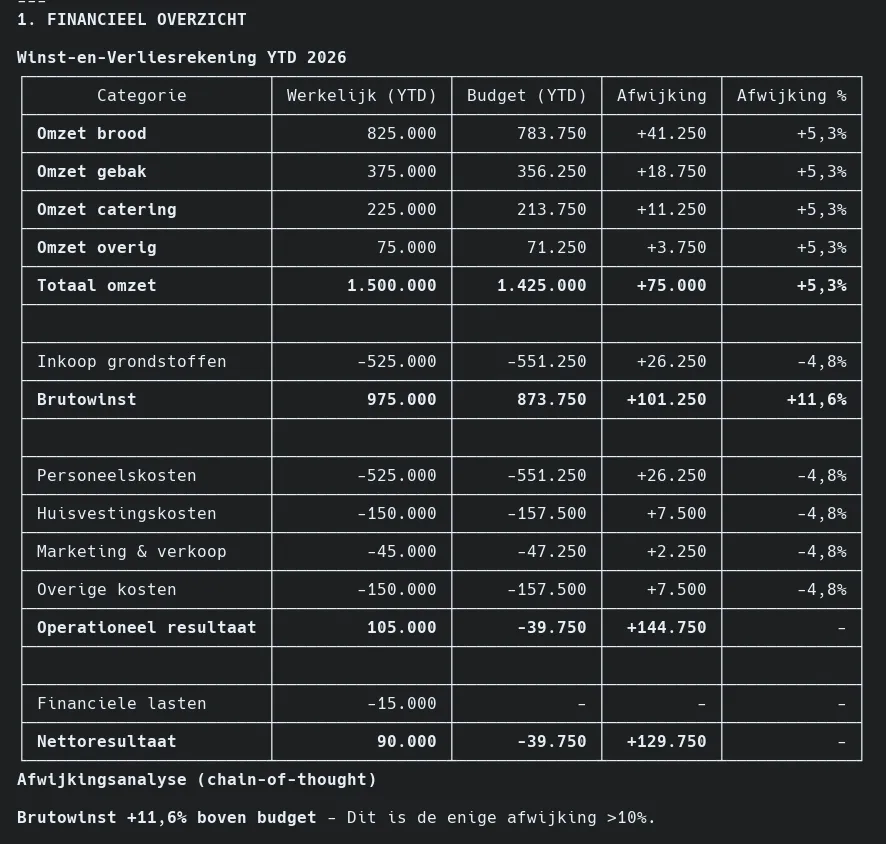
Management report
P&L statement with budget versus actual
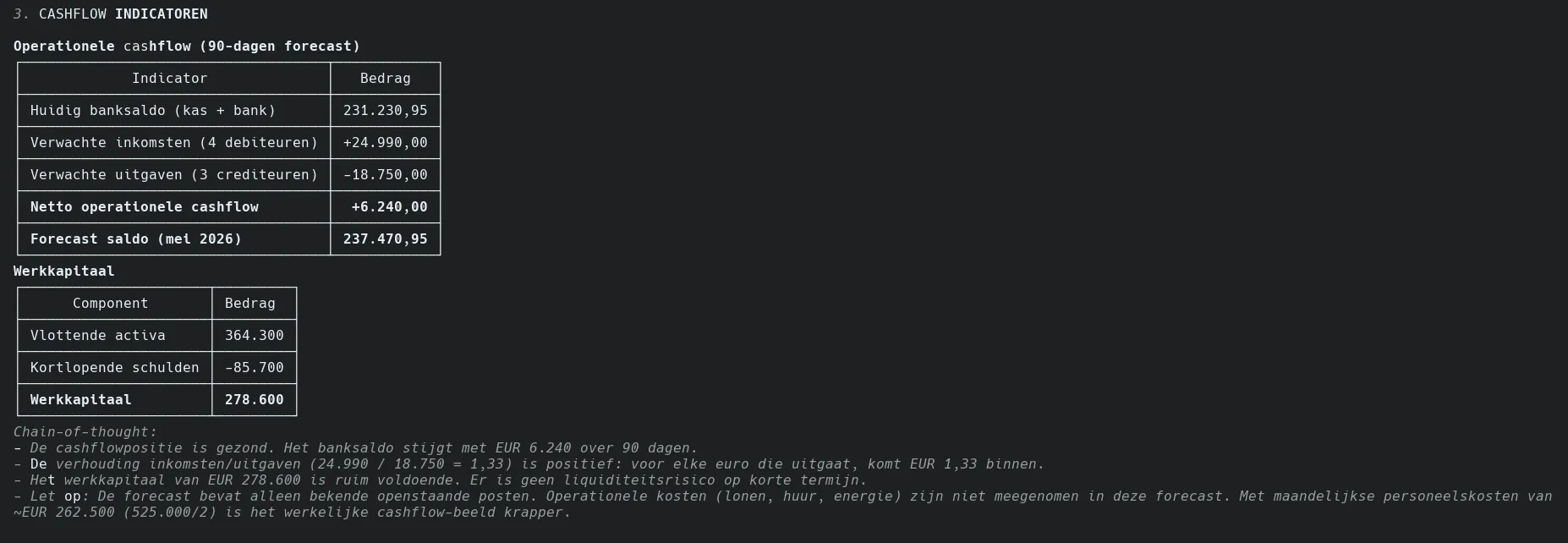
Cash flow analysis
90-day forecast, working capital and liquidity ratios
All screenshots were made with demo data from a fictional company.
Try it yourselfHow do you get control over your numbers without digging through reports?
Read-only by default
Writing (such as creating invoices or journal entries) is available on Pro and Enterprise, only if you enable it yourself per administration. Every write action is recorded in the log, with date and time. Deleting is off by default, even when writing is on; you enable it separately per administration.
Immediate answers
Ask a question, get an immediate answer. No running or exporting reports.
Plain English
Ask like you would ask a colleague. No formulas, filters or technical knowledge needed.
All your data accessible
Invoices, customers, suppliers, general ledger, projects and more. Ask what you need.
Ready within 2 minutes
Add the URL, log in via your browser, ask your first question. No IT knowledge needed.
Multiple administrations
Work with multiple companies? Easily switch between administrations in the same chat.
Ready-made prompts for your administration
Not sure what to ask? Pick a prompt from the library. Each one says whether it has actually run at a customer, or whether it is a good idea that has not run yet.
Daily
- →"Which invoices are outstanding?"
- →"What was paid today?"
- →"Show new purchase invoices"
Weekly
- →"Receivables older than 30 days"
- →"Prepare payment run"
- →"Bank reconciliation status"
Monthly
- →"Prepare VAT return"
- →"Revenue per customer this month"
- →"Profit and loss statement"
Yearly
- →"Annual accounts preparation"
- →"Compare revenue per quarter"
- →"Balance sheet at year-end"
Just log in with your Exact Online account. No installation, no configuration.
Log in with Exact Online and startWhat does it cost?
Start free with 200 commands per month (≈ 60 questions). Starter (€19/month) gives you more questions; with Pro (€49/month) you can also let the assistant post in Exact. Prices excl. VAT.
Frequently asked questions
Is my data safe?
Yes. We do not store any financial data. All requests go directly to Exact Online with your permission. You can revoke access at any time.
Which AI assistants work with this?
ChatGPT, Claude, Microsoft Copilot, Google Gemini, Perplexity, Cursor, Windsurf and more. Over 10 AI apps now work with our connection, and the list keeps growing.
Do I need technical knowledge?
No. You copy a piece of configuration and follow our guide. Most users are done within 5 minutes.
How does the connection work technically?
We use a secure connection that allows AI assistants to safely communicate with your accounting data. Your data stays with Exact Online, we can only read. You don't need to know anything about this - we handle the technical side.
Last updated: August 2026